Introduction
I want to be able to raise system level interrupts from PIO programs and there aren’t too many examples of this, so here is my simple contribution.
PIO program
First, the PIO program, which simply waits for a pin to change and then immediately raises PIO IRQ 0.
.program irq_example
.wrap_target

wait 0 pin 0    ; wait for a 0 on IN pin 0
irq nowait 0    ; raise PIO IRQ 0

.wrap
Compile this with pioasm then #include the .h in your C program.
C Program
Interrupt Setup
There are four system level interrupts related to PIO: PIO0_IRQ_0, PIO0_IRQ_1, PIO1_IRQ_0, PIO1_IRQ_1. We shall use PIO0_IRQ_0.
First we attach an interrupt handler to PIO0_IRQ_0:
void isr(void) {
    // clear PIO IRQ 0 that was raised by irq nowait 0
    pio_interrupt_clear(pio0, 0);
}

irq_add_shared_handler(PIO0_IRQ_0,
                       isr,
                       PICO_SHARED_IRQ_HANDLER_DEFAULT_ORDER_PRIORITY);
It is important that pio_interrupt_clear() is called otherwise the CPU will lock up constantly executing the interrupt handler (aka ISR - interrupt service routine)
We then enable the interrupt:
irq_set_enabled(PIO0_IRQ_0, true);
Finally we configure PIO0_IRQ_0 to be triggered when PIO IRQ 0 is raised:
pio_set_irq0_source_enabled(pio0, pis_interrupt0, true);
The functions used above are described in the Pico C SDK documentation.
PIO Setup
The PIO program can now by installed the usual way by first setting up the state machine:
uint sm = pio_claim_unused_sm(pio0, true);
uint offset = pio_add_program(pio0, &irq_example_program);
pio_sm_config cfg = irq_example_program_get_default_config(offset);
Configure and connect GPIO to the state machine:
// connect GP 2 to IN of state machine
sm_config_set_in_pins(&cfg, 2);

// it is an input pin
pio_sm_set_consecutive_pindirs(pio0, sm, 2, 1, false);

// we want pull up on the pin
gpio_pull_up(2);
Now we are ready to start the state machine:
pio_sm_init(pio0, sm, offset, &cfg);
pio_sm_set_enabled(pio0, sm, true);
CO2 concentration is a proxy for how well a space, especially an enclosed one, is ventillated. To this end I build a quick-n-dirty CO2 sensor using a SCD41 breakout board from pimoroni and bits and pieces I had in the workshop.
Took the opportunity to practice making enclosures, especially for …
Introduction
Bought some cheap USB driven warm-white LEDs off eBay for lighting display cabinets. Turns out it is just normal LED strips with a simple driver in the USB plug. Wanting to unify control of multiple LED strips into a single point I build a simple PWM based LED driver …
Arduino-Makefile needed coaxing to in order to compile code targeting the SparkFun Pro Micro 3.3V. A major source of headache is the requirement for BOARD_SUB which isn't documented and required diving into the source code, and also the fact the Pro Micro has 2 PIDs for each variant (5V …
I recently started having trouble with Arduino 1.6.x not being able to program Arduino Micro or SparkFun Pro Micro, with avrdude complaining about permission denied when trying to open /dev/ACM0.
The usual solutions to this is to add oneself to the dialup group, or mess around in …
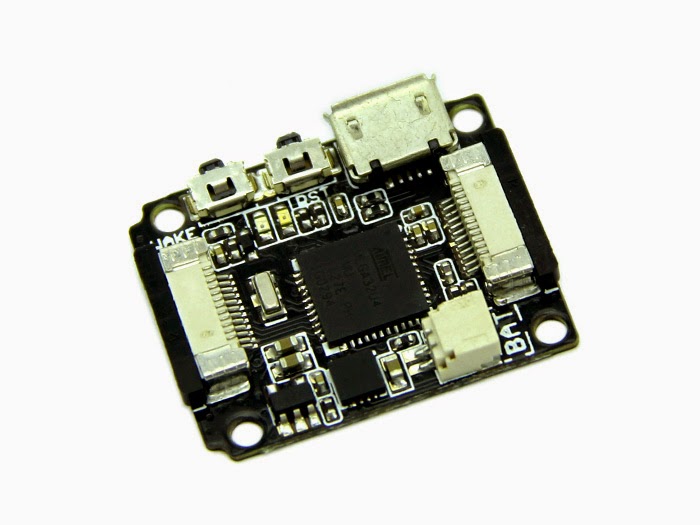 I bought a Seeedstudio Xadow recently, and to get it to work with Arduino 1.6.3 was bit of a pain. Long story short, you can find the necessary files along with pithy instructions at my github repo.
The most crucial difference between the files Seeedstudio supplied and what …
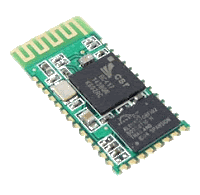
Some notes on using the popular Bluetooth serial module RF-0417C:
- When sending AT commands, do not include \r\n either together or singly.
- It appears to be happy to receive 5V inputs to TX.
- It is not happy to receive 5V to Vcc.
- If you connect a LED, it blinks …
Just finished packaging my engineering thesis project into a more portable format: an altoids tin! I have seen people put some neat stuff inside them, and I am chuffed I managed to as well :) Though I had to cut through the lid for the display. And I only had to …
Note: in arduino-0017, floating point printing is supported by default. The function below is not necessary.
``` brush:c
void floatPrint(float f, int places=6)
{
int _d;
if (f < 0)
{
Serial.print("-");
f*=-1;
}
    _d = (int)f;

    if (!places)
    {
            return;
    }

    Serial.print(_d, DEC);
    Serial.print('.');

    while(places--)
    {
            f-=_d …
I spent the better part of two hours struggling with your average HD44780 driven 16x2 character LCD, even though I was using the LiquidCrystal library that comes with the arduino environment. My problem was the text I was printing out looks like this:
I tried a lot of things, like …

This circuit has (as far as I can tell), 0 off current, and 17mA on current. It is latched by the momentary push button, and can be turned off by applying >0.7V at the input as shown. It is intended for use with embedded interactive installation (e.g. an …
The microbric viper is neat. Good quality parts and unique idea. Makes a decent robotics platform if you get the wheel add-on. However, you gotta have small fingers to get some of the parts in place. Despite this, the hardware is solid, I like it. The one thing I would …
Got my hands on a ADJD-S371 on a breakout board from Sparkfun. The code below can be used to calibrate it. The most up-to-date version of the code can be found at my git repository under colour_sensor_calibration.
``` brush:cpp
include
/ Calibrates the sensor to get white balance. Pin 2 should …
A simple 2 DoF setup with an accelerometer (LIS302DL) attached to the effector. The seeeduino attempts to drive the servos so the Z and Y axis measure zero acceleration. The sketch is available at the usual place.
The algorithm employed is a simple PD controller with pseduo-gradient stepping to determine …
2x16 character LCD displays can be tricky beasts. I got mine working today with my seeeduino (an arduino compatible board with more awesome), and really wished I had known that:
-
The contrast pin needs to be in the same power network as the power and ground pins. The contrast pin …